OurCarClub users with sufficient privileges have the ability to grant access to other members.
Granting Access
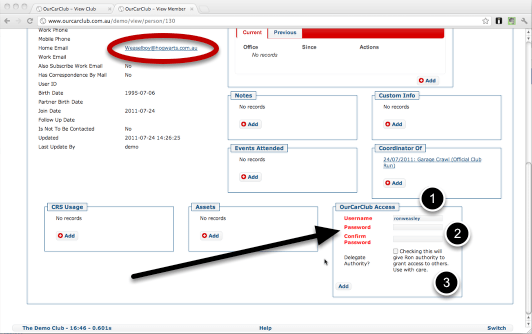
You can grant existing members access to your OurCarClub system easily. At the bottom of the regular "View Member" page you will find the following panel.
- A suggested username is provided, but you have the option to change it. Username must be between 3 and 11 characters in length, and it will warn you if the name you’ve chosen is not available.
- Enter a starting password, and confirm it.
- You have the option to delegate authority – meaning that this user will also be able to grant access to others, reset passwords and so on.
When you click Add, an email will automatically be sent to the member to let them know their login details. If they don’t have an email address, you’ll have to let them know yourself.
Access Granted
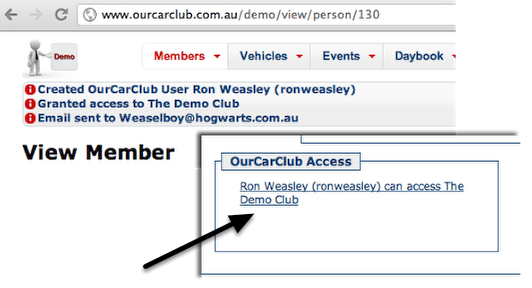
After clicking the Add button, the following messages are displayed, and the Access box shows that the user can access this system. Click on that link to edit or delete this access, or to reset the user’s password.
Resetting Passwords
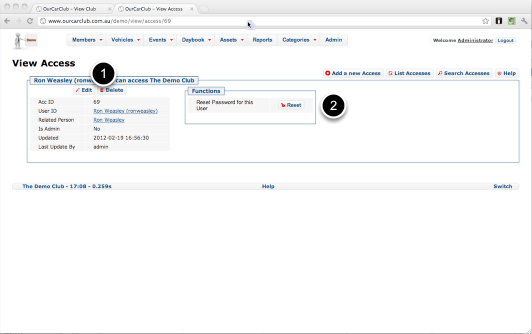
- The usual Edit and Delete buttons allow you to manage this access (i.e. upgrade to Administrator or remove Administrative privilege)
- The Reset button will generate a new password and email it directly to the user.
 OurCarClub