In addition to the ability to export data, OurCarClub comes with a series of "Standard" reports. In this chapter we will look at how to choose a report, provide parameters to it, and run it.
The Reports Menu
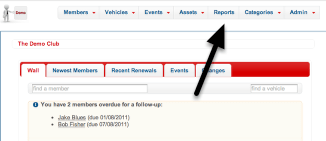
From any page, you can find the list of predefined reports from the main menu.
Standard Reports
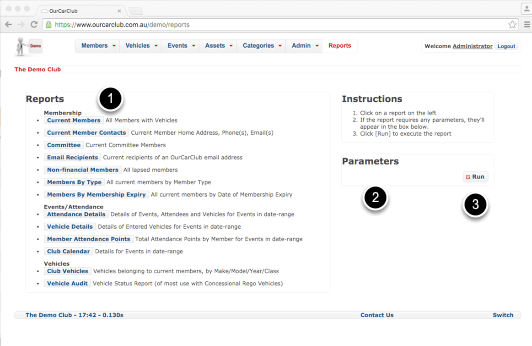
- The Standard Reports are presented as a list, organised by type – Membership related, Attendance related, Vehicle related and so on.
- You will notice the "Parameters" area is empty: once a particular report is selected, the parameters required to run it (if any) will appear. Some reports, such as Current Members and Committee do not require any parameters. Member Attendance requires date parameters.
- Clicking the Run button will execute the report.
Running a Simple Report

Click "Current Members" and it is highlighted. As mentioned previously, this report requires no parameters. Clicking Run will generate the report.
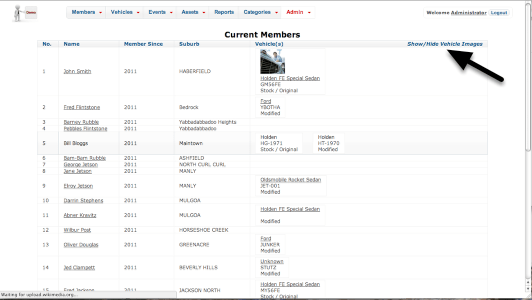
The resulting report can easily be printed on paper or as a PDF. Some reports have additional interactivity – this one has an option to hide the vehicle images to reduce the size of it.
Standard Report with Parameters

Some reports require parameters before executing. For example, Attendance Details and Member Attendance Points both require a range of dates (pictured). In both cases, From Date and To Date default to a year ago from today and today, respectively.
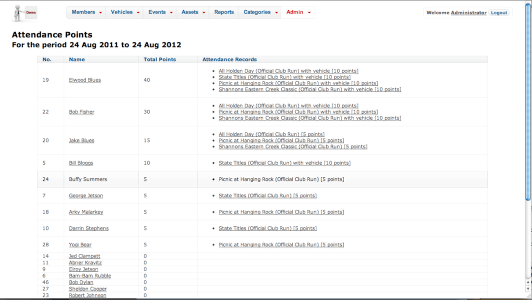
An example of the Member Attendance Points Report output.
 OurCarClub