Just as a Member has many attributes and related pieces of information, so too does a vehicle.
Viewing an Individual Vehicle
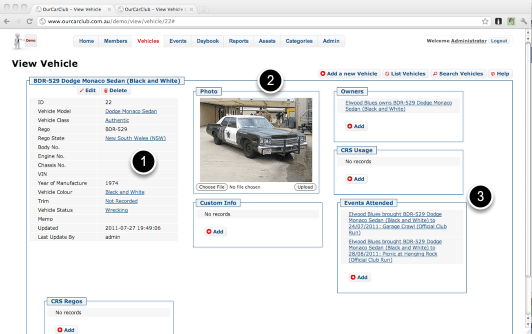
All View pages are similar in design: the left hand side has the attributes of the item being viewed, with Edit and Delete buttons. The boxes to the right and underneath show related pieces of information, where there may be none, one or many related records.
- Attributes of this vehicle. Any fields that are shown as links denote a relationship to a category or item. Clicking on “Authentic”, for example, would take you to a page showing all the vehicles thus classified. (More on this later…)
- You can upload an image of your member’s vehicle from this page, or you can provide a URL to an existing image on the web. OurCarClub supports a main image for each vehicle, and up to 8 additional images. This should be sufficient for clubs in jurisdictions where photographic records of vehicles on “Club Plates” need to be maintained (such as VicRoads).
- Another example of linked information. This vehicle may have attended many events, and you can navigate to a specific attendance record via the link.
 OurCarClub